Data Values
User Interface
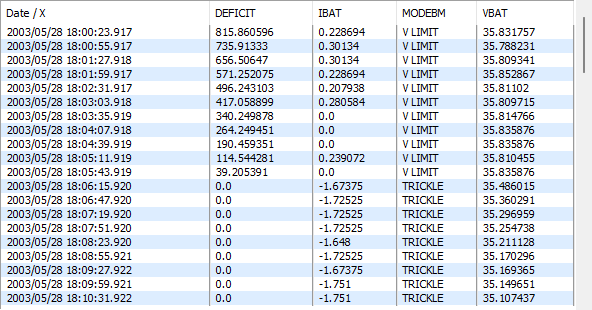
The Show Data window displays a table of the actual data values for a number of data sets with their complete date. It can be displayed from the Data Sets window by selecting the sets to see and pressing the main  button, or linked to a Graph window by clicking on the graph window with the left mouse button to pull it in front of the others then pressing the graphs button.
Tip
Pressing the right mouse button over any of the data cells will display a menu to copy the value of the cell to the clipboard.
Linked Data
If the window was opened linked to a graph window then specific data values can be found on the graph by selecting a value in the table with the left mouse button, the corresponding data point(s) on the graph will be highlighted.
Any data points selected on the graph with the left mouse button will also be highlighted in the Show Data window.
Note
The use of this feature requires working with sorted datasets.
Show Data Selection window Menu
The show data selection menu contains the following specific entries:
- Export Data - will ask for a filename to export the data for all the displayed data as a Tab File.