Advanced Preferences
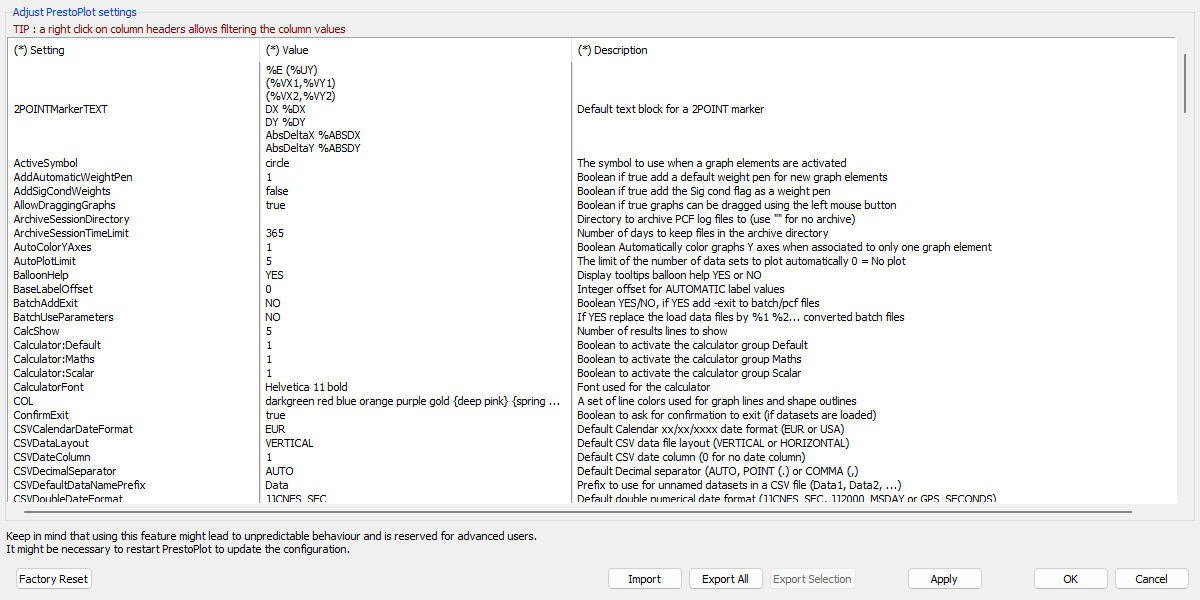
This window allows changing the value of PrestoPlot configuration parameters. The table displayed contains three columns:
- Setting - The parameter name.
- Value - The parameter editable value.
- Description - A short description of the parameter.
Tip
The table can be filtered by pressing the right mouse button on any column heading.
Tip
Any values which are different from the defaults will be displayed in BOLD.
Pressing the right mouse button over any of the data lines will display a menu which can include:
- Copy the option name to the clipboard.
- Copy the cell contents to the clipboard.
- Copy the selected option names to the clipboard.
- Reset an option to its default value.
Some parameters might not appear if they are specific to a mission that was not loaded in PrestoPlot.
Some parameters might be greyed out and their value non-editable if the LockList parameter was defined in the INI file.
There are seven buttons on the bottom of the advanced preferences window:
- Factory Reset - Reset all option to their default values.
- Import - Import a set of parameters defined in a file with the same format as the INI file. A parameter blocked by
LockListwill not be imported. - Export All - Export all parameters to a file with the same format as the INI file.
- Export Selection - Export selected parameters to a file with the same format as the INI file.
- Apply - Accept all changes but do not close the window.
- OK - Accept all changes and close the window.
- Cancel - Ignore any change and close the window.
Tip
Pressing Control-a will select all rows in the table for copying/exporting.
Keep in mind that using this feature might lead to unpredictable behaviour and is reserved for advanced users. It might be necessary to restart PrestoPlot to update the configuration.