FFT dialog
Fast Fourier Tranform - Produce the Spectrum Phase and Spectrum Modulus datasets based on frequency from datasets values. See FFT Wikipedia for more details.
FFT calculation is based on a regular sampling of the input signal.
User Interface
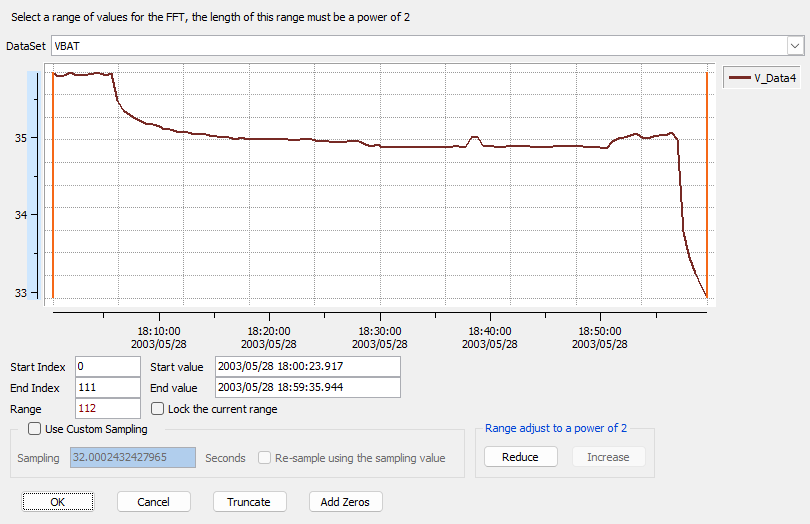
The Fast Fourier Transform dialog can be used to configure the options:
- Dataset - Select a Dataset from the list.
- Preview - dynamic preview of the range to be processed the start/end markers can be used to adjust the range.
- Range - The current preview range.
- Start Index - numerical index of the start marker from the preview.
- End Index - numerical index of the end marker from the preview.
- Range - Number of values in the range.
- Lock the current range - Fix the preview range, moving the start/end markers will move both together.
- Use Custom Sampling - Is the custom sampling factor in seconds to use.
- Re-sample - If checked will resample the values of the input dataset using the sampling value and the origin date of the dataset.
- Range adjustment is used to adjust the range of processing.
- Reduce - Reduce the preview range to the next smaller power of 2.
- Increase - Increase the preview range to the next larger power of 2.
- OK - Close the dialog and process the settings.
- Cancel - Close the dialog without processing.
- Truncate - Close the dialog and process the range from 0 to the largest power of 2 possible.
- Add Zeros - Close the dialog and process the range from 0 to the next power of 2 possible.
Custom sampling: here it is supposed that data samples are indeed acquired regularly but that the time stamps associated to each of them are not regular. This option takes the sampling value supplied and consider the data samples as they are.
Custom sampling and resampling: here it is supposed that data samples are not acquired regularly and that the time stamps are reliable. This option takes the sampling value supplied and interpolates data values at regular time stamps.