Customize graphs
The Configure Graph window changes the appearance of the graph window plot area.
User Interface
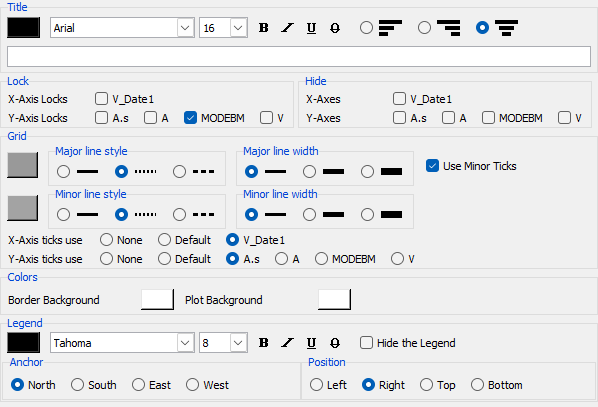
Configure Window Menu
The dialog menu contains the following specific entries:
- Copy configuration command to clipboard - Copies only settings different from the defaults to the clipboard as a
-configuregraphcommand line option. - Copy complete configuration command to clipboard - Copies all the current set of settings to the clipboard as a
-configuregraphcommand line option.
Tip
This can be activated using the two shortcut buttons on the bottom of the dialog
Configuration
You can modify the following elements:
-
Title Change the text, color, font, and alignment of the title message.
N.B. Alignment applies only to multi-line titles created using
\nto break up the lines. -
Lock Each axis on the graph can be locked or unlocked to prevent zooming the axis when zooming.
-
Hide Each axis on the graph can be shown or hidden to increase the visible area.
-
Grid The plot area contains a grid of lines associated with one X and one Y axis. You can change the color, line thickness, and line style, as well as choose to display grid lines for the minor ticks on the axes.
-
Colors Change the border and background colors.
Tip
When printing graphs on a black and white printer, a white border color is best.
- Legend Change the color and font of the legend text and the position of the legend on the graph window. "Position" is the placement with respect to the graph, and "anchor" is the placement within the side position.
Tip
The compass points change the relative position, so East/West are very similar on the Left and Right sides.