Filter Event Markers
User Interface
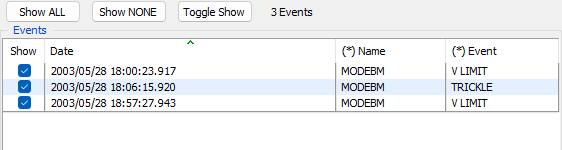
The Filter Event Markers window allows hiding/Showing events from a graph The name of the graph and the axis are displayed on the title bar.
The window has two sections, a button bar with three buttons and a table of events to be filtered. The buttons allow:
- Show ALL - Change the state of all of the visible checkboxes to be checked.
- Show NON - Change the state of all of the visible checkboxes to be unchecked.
- Toggle Show - Toggle the state of all of the visible checkboxes to be the inverse state.
The label shows counters for the numbers of - total markers/ total visible markers/filtered markers ans selected markers.
The table shows 4 columns for each event: - Show - A check box showing the visible state of the event marker. - Date - The date for each marker. - Name - The name of the group of markers. - Event - The label for each marker.
The Name and Event fields can be filtered by clicking with the right mouse button on the column header, or clicking on one of the names/labels with the right mouse button and selecting the filter option from the menu.
A right mouse click on the event list will display a popup menu allowing the same actions as the buttons on the set of selected markers.
Tips
Pressing the Space bar with any rows selected will toggle the checkboxes for each of the selected rows.
Pressing the Space bar AND the Shift key with any rows selected will check the checkboxes for each of the selected rows.
N.B. Model files (PMD) do not store the events, so their visible state cannot be restored from a PMD file.