Configure Markers
The Configure Marker window changes the appearance of one marker. The name of the graph, the data set name and the type of marker are displayed on the title bar together with a count of the total number of markers positioned for this data set.
User Interface
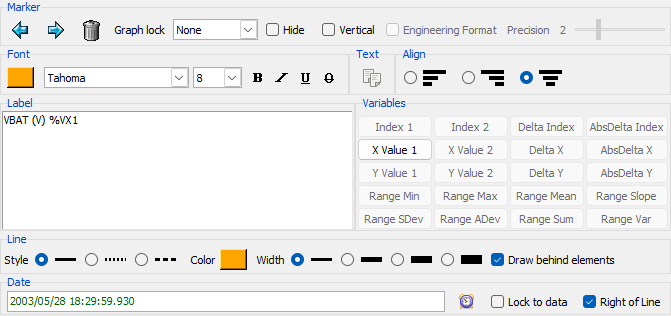
Configure Window Menu
The dialog menu contains the following specific entries:
- Copy configuration command to clipboard - Copies only settings different from the defaults to the clipboard as an
-addmarkercommand line option. - Copy complete configuration command to clipboard - Copies all the current set of settings to the clipboard as an
-addmarkercommand line option.
Tip
This can be activated using the two shortcut buttons on the bottom of the dialog
Configuration
The following elements can be changed:
Marker
Cycle through the markers for this data element, delete the current marker, lock the markers position to the graph so it can no longer be moved accidentally, temporarily hide the marker and change the label orientation. It is also possible to change the format for displayed values, using either 'Engineering' (1.2345e+010) or 'Floating' format (123.456) and the number of decimal digits displayed (0 to 8).
Font
Change the color and font used for the text segment of the marker.
Tip
The current text from the label can be copied using the  button
Align
Change the alignment of the text segment of the marker if it contains more than one line.
Label
Modify the contents of the text segment, this text can contain one of the following special sequences:
| Sequence | Description |
|---|---|
%E |
The element name. |
%UY |
The elements Units. |
%UX |
The elements X Units/Label. |
%VX1 |
The X position for VERTICAL, POINT and 2POINT markers. |
%VY1 |
The Y position for HORIZONTAL, POINT and 2POINT markers. |
%VX2 |
The X position for 2POINT markers second line segment. |
%VY2 |
The Y position for 2POINT markers second line segment. |
%N1 |
The number of the data element for POINT and 2POINT markers. |
%N2 |
The number of the data element for 2POINT markers second line segment. |
%DX |
The delta in X between the 2POINT markers two line segments. |
%DY |
The delta in Y between the 2POINT markers two line segments. |
%DI |
The delta in element numbers between the 2POINT markers two line segments. |
%ABSDI |
Absolute value of the delta in element numbers between the 2POINT markers two line segments. |
%ABSDX |
Absolute value of the delta in X between the 2POINT markers two line segments. |
%ABSDY |
Absolute value of the delta in Y between the 2POINT markers two line segments. |
%MIN |
The minimal Y data value in the range between the 2POINT markers two line segments. |
%MAX |
The maximal Y data value in the range between the 2POINT markers two line segments. |
%AVE |
The mean average Y data value in the range between the 2POINT markers two line segments. |
%SLO |
The slope of the graph for the 2 points of a 2POINT marker. |
%SD |
The Standard Deviation (the square root of the variance) of the range of data for the 2POINT markers two line segments. |
%AD |
The Average Deviation (the sum of the absolute values of the differences between the element and the mean value divided by the length of the data set) of the range of data for the 2POINT markers two line segments. |
%SUM |
The sum of the Y data values in the range between the 2POINT markers two line segments. |
%VAR |
The variance (the sum of the squared differences between each element and the mean) of the Y data values in the range between the 2POINT markers two line segments. |
An extra set of sequences is available for UsingX() calculated datasets if the original X axis dataset is still present:
| Sequence | Description |
|---|---|
%XD1 |
The date for this data point for POINT and 2POINT markers. |
%XD2 |
The date for this data point for the 2POINT markers second line segment. |
%XDD |
The delta between the dates for the 2POINT markers two line segments. |
%XDAD |
Absolute value of the delta between the dates for the 2POINT markers two line segments. |
Line
- Change the line segment's style, color, width and drawing order.
Value / Date
Tip
Use the  buttons to display a date Date Picker popup.
- Set the HORIZONTAL position value.
- Set the VERTICAL position date.
- Lock the marker's position to only be within the data limits for this data set.
- Change which side of the line the text is displayed.
- Set the POINT or 2POINT position (X value). The actual data point will be the point with the closest date/x value to the given value.
- Swap the two current dates/x values for a 2POINT marker.