Statistics
User Interface
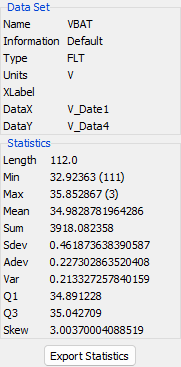
The Statistics window displays information about the selected data set and a set of statistics.
The following information is displayed:
- Set Name - the name of this set of data.
- Information - Information on the set of data.
e.g. The parameter description for this set of data (see PrestoDecom and APID in the PrestoDecom File ). - Type - one of
FLTfor numerical values orLABELfor state values orLABEL + FLTfor mixed. - Units - the units name for this data or none if not defined.
- X Label - the label for this datasets X axis. This will change for all datasets using the same date.
- Data X - the name of the data vector containing the X values (in general this vector contains the dates).
- Data Y - the name of the data vector containing the Y values.
The following statistics are displayed:
- Length - the total number of data values.
- Min - the smallest Y data value in this set, followed in brackets by the number of the smallest element. If there is more than one element with this value then the number of the first element is given followed by the number of minimum value elements.
- Max - the largest Y data value in this set, followed in brackets by the number of the largest element. If there is more than one element with this value then the number of the first element is given followed by the number of maximum value elements.
- Mean - the mean average value for the data set.
- Sum - the sum of all the data elements.
- Sdev - the Standard Deviation of the data elements (the square root of the variance).
- Adev - the Average Deviation of the data elements (the sum of the absolute values of the differences between the element and the mean value divided by the length of the data set).
- Var - the Variance of the data set (the sum of the squared differences between each element and the mean, the Variance is the sum divided by the length of the data set minus 1).
- Q1 - the first quartile of the data set.
- Q3 - the third quartile of the data set.
- Skew - the Skewness (or third moment) of the data set (this characterises the degree of asymetry of the data set about the mean).
The Export Statistics button at the bottom of the window will write these values to a tab separated text file compatible with Excel.