CSV Configuration dialog
The CSV Load dialog allows configuring the various CSV options to load specific CSV files.
User Interface
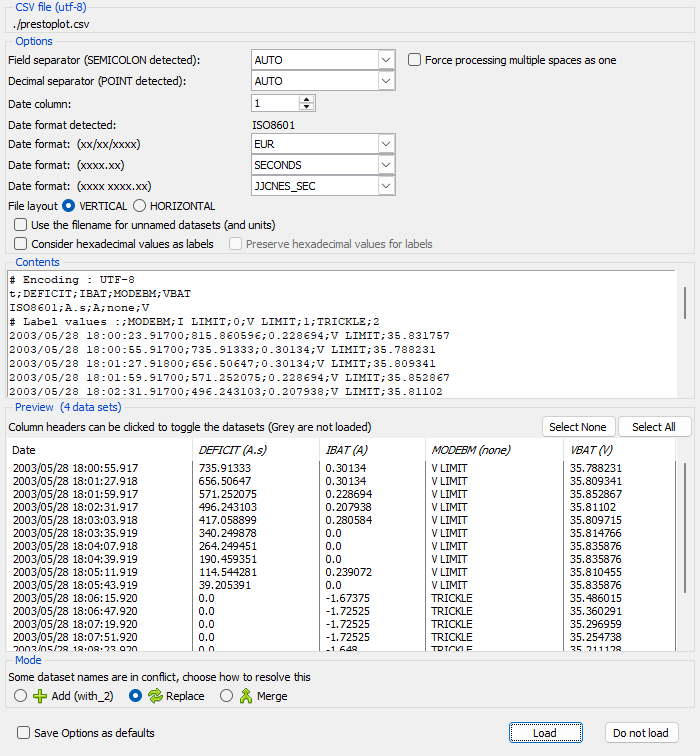
The dialog is activated by pressing the SHIFT key at the same time as opening (Open button, Control-Shift-O, Shift-DropFile, Control-Shift-V) a data file.
The dialog has the following elements:
- CSV file - The full path to the file and the encoding used for the load.
- Options - The set of configuration options used to process the file contents.
- Field separator, separating the different columns of data. (use AUTO for automatic detection)
- Date column, number 1 is the first column. (use 0 for no date columns)
- Decimal separator used in decimal numbers. (use AUTO for automatic detection)
- Date format detected.
- Format to use for calendar dates. (xx/xx/xxxx).
- Format to use for numerical dates. (xxxx.xx).
- Format to use for double entry dates. (xxxx xxxx.xx)
- File layout. The orientation of the data in the file. (VERTICAL/HORIZONTAL)
- Use filename for unnamed datasets. If a CSV file does not contain the naming headers (Names and/or Units) use the name of the file as a base for naming the datasets.
e.g. If the file name is 'IBAT(A).csv', then the dataset will be named 'IBAT' with its units set to 'A'.
- Select if hexadecimal values (0xnnn) should be imported as labels or decimal values, and if the numeric values should be preserved.
- Contents - A textual preview of the file contents.
- Preview - An preview of the dataset contents if loaded using the current options. The two buttons will select
NONEof the columns to be loaded orALLof the columns.N.B. Columns can be removed from being loaded by clicking with the mouse on the column headers. greyed out columns will not be loaded.
Tip
Pressing the SHIFT key and clicking or right clicking on the column header will set this column to the date column.
- Mode - The mode used to resolve conflicts with already loaded datasets.
N.B. Conflicted datasets have their column names in ITALIC and can be selected to not be loaded.
- Save options as defaults - The set of options will be saved to the ini file when the file is loaded.
- Load - Load the chosen datasets using the chosen mode if necessary, and close the dialog.
- Do not load - Do not load the file and close the dialog.