Date Picker
This popup window allows choosing a date from a collection of dates
User Interface
Note
PrestoPlot will do its best to convert the dates into different formats, however not all formats are compatible, it is up to the user to choose relevant dates.
The date can be chosen from the following:
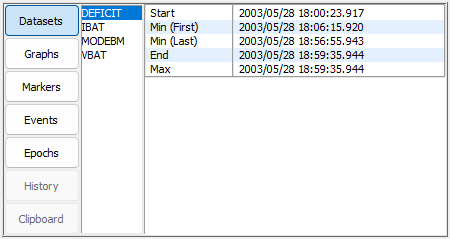
Datasets
The list of datasets available and for each one (in chronological order):
- Start - The first date in the dataset.
- End - The last date in the dataset.
- Min - The date of the minimum value in the dataset.
- Max - The date of the maximum value in the dataset.
- Min (First) - The date of the first minimum value in the dataset if there is more than one.
- Min (Last) - The date of the last minimum value in the dataset if there is more than one.
- Max (First) - The date of the first maximum value in the dataset if there is more than one.
- Max (Last) - The date of the last maximum value in the dataset if there is more than one.
Graphs
The list of graphs available and for each one (in chronological order):
- Min dataset - The current minimum for the datasets date axis.
- Max dataset - The current maximum for the datasets date axis.
Markers
The list of graphs available and for each one (in chronological order):
- Marker - The date for each this markers lines (vertical, point and 2point).
Events
The list of graphs available and for each one (in chronological order):
- Event - The name and date of the event
Epochs
The list of Epochs configured globally and for each graph (in chronological order):
- Global - The configured
DefaultDateFormatEpochEpoch date. - Graph - The current Epoch date defined for this graph
History
A list of the last chosen dates in selection order.
Clipboard
If the clipboard contains a date then this date can be chosen